
Gantt task bars not printing

Joined
Jan 22, 2019
Messages
1
Reaction score
0
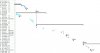
Sometimes when I print a Gantt chart, either to PDF or a printer, the task bars don't print. It seems random. Sometimes it happens, sometimes it doesn't, in the same project, with no change in settings (see attachment). And as you can see on the attachment, it's only some of the bars.

I am using MS Project 2013.

Does anyone know how to prevent this or why it is happening?
 

Attachments

  • BlankTaskBars.JPG
    BlankTaskBars.JPG
    51.6 KB · Views: 476

CTG

Joined
Feb 12, 2019
Messages
1
Reaction score
0
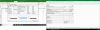
Try editing the bar styles under Format Tab.
Click Format Tab, Click Format, Select Bar Styles.
Make sure you have required tasks added. This might help.
upload_2019-2-12_10-36-3.png
 

Attachments

  • upload_2019-2-12_10-33-44.png
    upload_2019-2-12_10-33-44.png
    237.3 KB · Views: 434
Joined
Oct 16, 2019
Messages
1
Reaction score
0
Sometimes when I print a Gantt chart, either to PDF or a printer, the task bars don't print. It seems random. Sometimes it happens, sometimes it doesn't, in the same project, with no change in settings (see attachment). And as you can see on the attachment, it's only some of the bars.

I am using MS Project 2013.

Does anyone know how to prevent this or why it is happening?
I have found 2 ways to fix this in MSP2010, so it should work in 2013:
1. Copy all tasks into a blank Project schedule and save as a new file.
2. Select all tasks, drag the row heights increasing them to something silly (about an inch or 2). Save. Select all tasks again and drag the row heights back to where you want them to be.
 
Top