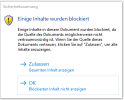
Suddenly when I open a specific notpad file a content blocked message apears (see attachment). There are two choices:
1.) accept
show complete content
2.) ok
Do not show blocked content
Unfortunatly there is no choice to show the blocked content.
The file content is text and pictures (jpg).
As I did not asume the pictures to be the problem I copied the text of both choices into a separate text file
and run a diff on them.
Result: absolutely identical!
So where is the problem?
Rgds
Dieter
1.) accept
show complete content
2.) ok
Do not show blocked content
Unfortunatly there is no choice to show the blocked content.
The file content is text and pictures (jpg).
As I did not asume the pictures to be the problem I copied the text of both choices into a separate text file
and run a diff on them.
Result: absolutely identical!
So where is the problem?
Rgds
Dieter