
How do you auto-number a large list of rows in Excel?

G

Gord Dibben

Sarah

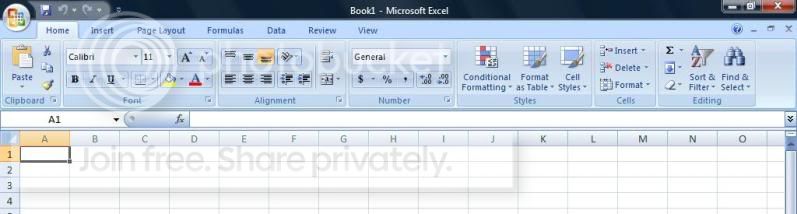
On Home tab go to far right to "Editing" section.

Click on the downarrow icon to see a list of fill options.


Gord Dibben MS Excel MVP

im using this new version of Excel which has no 'edit'. it looks like this:
excel.jpg


tim m said:
Hi light the cells you want to number and 'Edit'...'fill'....'series' (step
value is how much the numbers increase by and stop value is the highest
number.)
 
E

Eltayeb Elsheikh Bakheet

Birdieguy said:
Without having to type each number from 1 to, say, 300, and hit the down
arrow or enter in between each, isn't there a command in Excel that will
automatically do this for you?
 
P

Pecoflyer

As you have not detailed your question, I would suggest entering =row()
in A1and pull down as needed
 
R

redgoose

sarah said:
im using this new version of Excel which has no 'edit'. it looks like this:

excel.jpg


tim m said:
Hi light the cells you want to number and 'Edit'...'fill'....'series' (step
value is how much the numbers increase by and stop value is the highest
number.)
 
Top